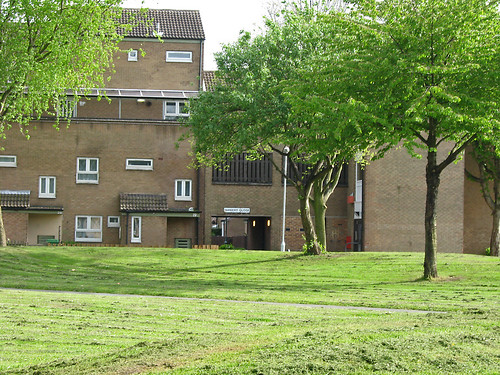
I have been mapping The Meadows in a desultory way now for a while: it's not the best part of town so I like to keep mapping visits fairly short. The areas which were re-developed in the early 1980's have an amazing complexity of footpaths, and short side roads. Varying height buildings also sometimes contribute to a canyon effect with the GPS, particularly in the parts which still consist of late 19th century terraced housing.
The Meadows were originally the water meadows of the town of Nottingham, famous in the spring and autumn for displays of crocuses (Crocus vernus in Spring and C. nudiflorus in Autumn). These non-native plants are supposed to have been introduced to the Nottingham area by the monks of the Clunaic Lenton Priory. They still survive in various sites in and around the city (for instance the General Cemetery, Waterloo Promenade, University Park). The area started being developed after the Nottingham Enclosure Act of 1845, when certain parts of the area were dedicated as green spaces (e.g., Queen's Walk). The remainder was largely developed as high density terraced housing with some small scale industry. A colliery opened by the River Trent around 1910, followed by a council-owned power station (both now the site of a retail park). This was what led to the story of an ignorant DJ introducing a request with "Crocus Street, The Meadows. What a lovely address!".
By the 1960s this was one of the areas the council was anxious to re-develop in what were then known as slum-clearance programmes. The whole western portion was demolished in the mid-1970s, to be replaced by lower density housing with much more green space and small gardens for most properties. Additionally, private developers also built housing in this area. The remainder was re-developed piece-meal with the larger original houses being kept smaller less salubrious places being replaced. This accorded with changing planning fashions, with 'cellular renewal' replacing big bang clearance projects. Probably this was because by the late '70s it was clear that there were problems with many of the replacement buildings of the 1960s.
What staggers me is that now, thirty years later, the council wants to 'regenerate' the area. Apparently, its problem is all to do with the Radburn layout.
View Larger Map
One of the great things about worldwide on-line maps is that we can look at places as far apart as New Jersey and Nottingham in a similar way. On OpenStreetMap the cartography is the same worldwide too. This really brings home the differences between the real Radburn, and "Radburn", the planners concept.
The Meadows is obviously much more densely populated: it has a highly convoluted network of paths, whereas in the Radburn the purpose of each path is pretty clear just from the map. The green spaces are smaller, and less connected too. However, The Meadows housing is far pleasanter than its predecessors and the green spaces do sustain a decent amount of wildlife.
I also, doubt if Radburn has a deeply obscure house-numbering scheme, with houses on the same road having different streetnames. Some named roads don't have any addresses associated with them at all.
There are plenty of other places in the UK which are tarred with the now tainted "Radburn" name, like Oxmoor, Huntingdon, a suburb of Havant, suburbs of Telford such as Woodside, Dunclug, Ballymena (NI), and Deanbank, Penicuik (Scotland). Many of these bear only a tenuous resemblance to the original: a planning concept having been transmitted by chinese whisper. Some of the problems are glaringly obvious when one tries to map these places: its difficult to determine addresses, there are far too many paths around the back of properties, few shops have survived, the green space is festooned with "NO BALL GAME" notices. BUT, just as these designs were a planning fashion, it looks like denigrating them is one too. It seems too easy to lay the blame for problems in these areas on the original planners and architects, rather than understanding them as aspects of more complex social issues.
In case of The Meadows, the money for its has 'regeneration' disappeared in the great wave of government cuts. Perhaps this will lead to a more incremental approach, rather than the traditional waving of the planners magic wand to fix social problems.
The Meadows is obviously much more densely populated: it has a highly convoluted network of paths, whereas in the Radburn the purpose of each path is pretty clear just from the map. The green spaces are smaller, and less connected too. However, The Meadows housing is far pleasanter than its predecessors and the green spaces do sustain a decent amount of wildlife.
I also, doubt if Radburn has a deeply obscure house-numbering scheme, with houses on the same road having different streetnames. Some named roads don't have any addresses associated with them at all.
There are plenty of other places in the UK which are tarred with the now tainted "Radburn" name, like Oxmoor, Huntingdon, a suburb of Havant, suburbs of Telford such as Woodside, Dunclug, Ballymena (NI), and Deanbank, Penicuik (Scotland). Many of these bear only a tenuous resemblance to the original: a planning concept having been transmitted by chinese whisper. Some of the problems are glaringly obvious when one tries to map these places: its difficult to determine addresses, there are far too many paths around the back of properties, few shops have survived, the green space is festooned with "NO BALL GAME" notices. BUT, just as these designs were a planning fashion, it looks like denigrating them is one too. It seems too easy to lay the blame for problems in these areas on the original planners and architects, rather than understanding them as aspects of more complex social issues.
In case of The Meadows, the money for its has 'regeneration' disappeared in the great wave of government cuts. Perhaps this will lead to a more incremental approach, rather than the traditional waving of the planners magic wand to fix social problems.


